Integration
Clay + Synter
Clay builds audiences. Synter activates them on ad platforms.
No CSV exports. No manual uploads. No disconnected tools.
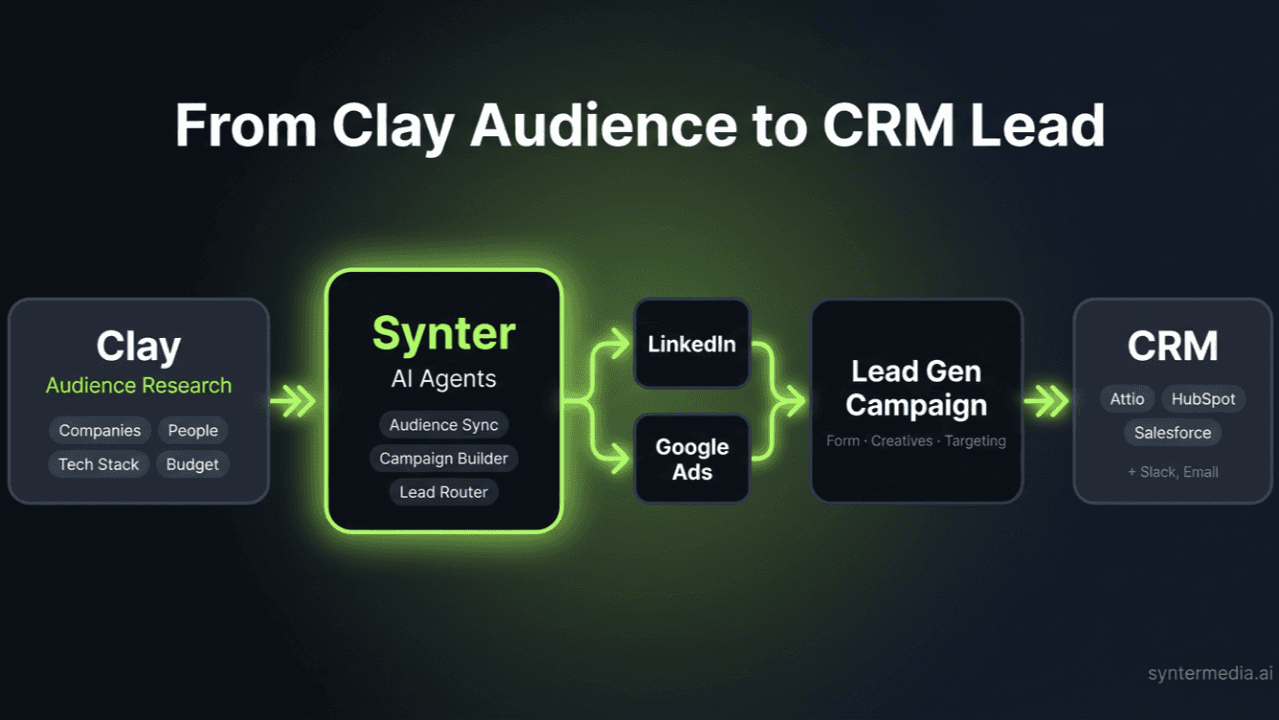
The Gap Between Enrichment and Activation
Clay is the best tool for building audiences. You can enrich leads from 150+ data providers, score accounts, filter by intent signals, and produce a clean list of exactly who you want to reach.
Then what? You export a CSV. Upload it to Google. Upload it again to LinkedIn. Upload it again to Meta. Wait for the match rates. Build the campaigns manually. And when the list changes next week, you do it all over again.
Synter closes that gap. Clay's AI calls Synter tools directly via MCP — push audiences to ad platforms and launch campaigns in a single step.
How It Works
Build in Clay
Enrich leads from 150+ data providers. Score accounts, filter by intent signals, and produce a clean list of exactly who you want to reach.
Sync via Synter
Clay calls Synter to push your list to Google, Meta, LinkedIn, or Reddit as a matched audience. No CSV. No manual upload.
Launch Campaigns
Build ads targeting your synced audience. Creatives, targeting, and budgets — all from one prompt.
Route Leads to CRM
Conversions flow back through Synter to Attio, HubSpot, or Salesforce. Attribution maps each lead back to the Clay record that sourced it.
Supported Platforms
| Platform | Match Type |
|---|---|
| Google Ads | Customer Match (email) |
| Meta (Facebook/Instagram) | Custom Audiences (email) |
| Matched Audiences (email, company) | |
| Custom Audiences (email) |
All audience syncs and campaign creation are included in your plan.
Why Synter Is Not “Just Another AI Ads Tool”
Ads are one channel inside one function inside growth. The entire AI marketing space is building single-channel point solutions that don't talk to each other. One tool for ad creative. Another for email sequences. Another for audience research. Each one calling itself “AI-powered.” None of them aware the others exist.
Your actual growth process looks like this: You research a market. You identify who to target. You craft positioning. You build creative assets. You distribute across ads, email, direct messages, and social. You measure. You adapt. You do it again.
That's not a task. That's a system.
Synter is AI agents for the entire growth process — research, creative, distribution across 43 advertising platforms, measurement, and adaptation. Not just the paid media slice of it.
— From “Stop Building AI for Ads” by Joel Horwitz
Quick Setup (2 Minutes)
1. Get Your Synter API Key
Sign up at syntermedia.ai and generate an API key in Developer Settings. Free to get started.
2. Add Synter as an MCP Server in Clay
In your Clay workspace, add Synter as a custom MCP server:
Server URL: https://mcp.synterai.com
Header:    X-Synter-Key: syn_your_api_key_here
3. Sync Your First Audience
Add a “Use AI” column in Clay and run:
Use Synter's sync_audience tool to push all emails
from the {Email} column to LinkedIn as a matched
audience named "Clay ABM List - Feb 2026".
Frequently Asked Questions
Can I push segments from Clay directly into Synter?
Yes. Synter has a native MCP integration that lets Clay's AI (Claygent and 'Use AI' columns) call Synter tools directly. Push segments to Google, Meta, LinkedIn, and Reddit as matched audiences in a single step — no CSV exports, no manual uploads.
How often does the data sync?
Each sync is triggered on-demand from within Clay. When your Clay table changes, re-run the 'Use AI' column to push the updated audience. Synter replaces the existing audience with the new list, so your campaigns always target the latest data.
Do I need a specific plan on Clay to use this?
No. Any Clay plan that supports 'Use AI' columns or Claygent will work with Synter's MCP server. You just need a Synter API key from syntermedia.ai/developer.
Can I use Synter to find new leads that look like my Clay segments?
Yes. Push your Clay segment as a seed audience to Google or Meta, and both platforms will build Lookalike/Similar audiences automatically. Synter handles the upload and campaign creation — you just provide the seed list.
What identifiers are used for matching?
Work email is the primary match key across all platforms (typically 70-80% match rate). For LinkedIn ABM campaigns, you can also use company names and domains. Synter hashes all PII (SHA-256) before uploading — raw emails never leave your environment.
Is there a cost for the integration itself?
The integration is free. Audience syncing and campaign creation are included in all Synter plans.
Can I track conversions back to specific Clay records?
Yes. By passing UTM parameters with Clay Record IDs through your landing page, you can attribute conversions back to the specific leads in your Clay table. Synter's attribution pixel captures these identifiers and maps them to ad platform conversion events.
How do I set it up?
Three steps: (1) Sign up at syntermedia.ai and generate an API key in Developer Settings. (2) Add Synter as an MCP server in your Clay workspace. (3) Use a 'Use AI' column to call Synter tools like sync_audience and create_campaign_for_audience.
Does Synter support Clay's Person and Company tables?
Both. Person tables sync via email matching (Google Customer Match, Meta Custom Audiences, Reddit). Company tables sync via LinkedIn Matched Audiences for ABM campaigns using company names or domains.
Can I filter audiences in Synter after they are pushed from Clay?
Yes. Once an audience is synced, you can layer additional targeting on top — job title, seniority, geography, interests, and more — using each ad platform's native targeting within Synter's campaign builder.
Resources
End-to-End Guide
Step-by-step walkthrough: Clay enrichment → audience sync → campaign launch.
Read guide →Architecture Deep Dive
MCP vs Webhook vs HTTP API — which integration pattern to choose and why.
Read post →Stop Building “AI for Ads”
Why single-channel AI tools fail, and why Synter built the full growth system instead.
Read on LinkedIn →Stop exporting CSVs. Start activating audiences.
Sign up, connect your ad accounts, and push your first Clay audience to a live campaign in under 5 minutes. No card required to start; add one when you launch. Free never auto-converts.
Get Started Free →